Liberty Create + Microsoft Teams
Over the last few weeks I’ve been building a solution that tightly integrates Netcall Liberty Create with Microsoft Teams, allowing workflow events, cases, tasks and approvals to surface directly inside Teams and deep-link users straight back into Liberty Create. The goal is simple: stop users having to constantly monitor dashboards and instead bring work to where they already spend their day.
What does it do?
The solution enables Liberty Create workflows to automatically generate Microsoft Teams Activity Notifications that:
- Appear in the Teams Activity Feed
- Notify users about case and task events
- Deep-link directly to a specific Liberty Create case, task, approval or workflow
- Support Microsoft Entra ID Single Sign-On (SSO)
- Run within a Teams-native experience rather than opening disconnected browser windows
Typical notifications include:
- New case assigned
- Task assigned
- Case due soon
- Task overdue
- Workflow approval required
- Case updated
- Case closed
These are delivered through custom Teams activity types registered within the Teams application.
High-Level Architecture
Liberty Create Workflow
│
▼
Azure Communication Service
│
▼
Microsoft Graph API
│
▼
Microsoft Teams Activity Feed
│
▼
EHDC Teams App
│
▼
Liberty Create (SSO)
│
▼
Case / Task / Approval
Service level management of Teams Activity Notifications
All of this is managed at Service level in CH so each service an be configured according to its activity
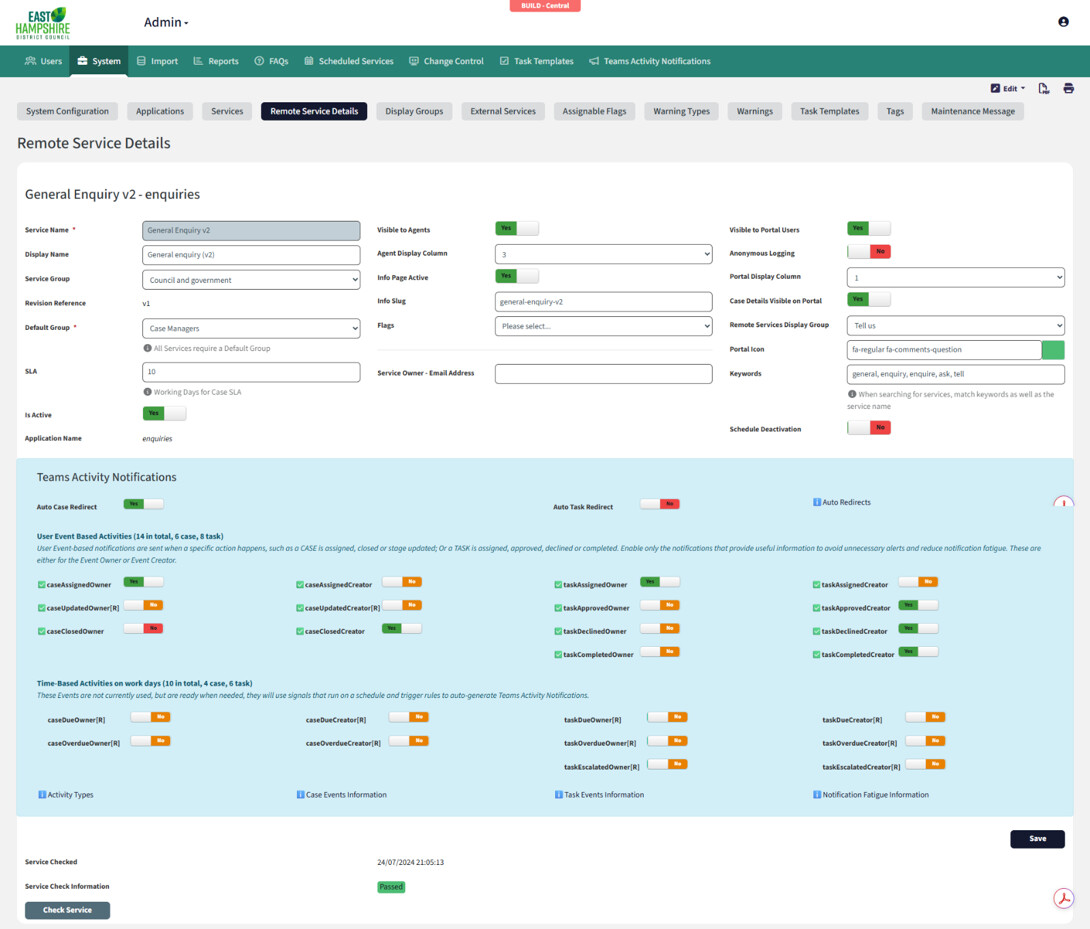
These notifications can be configured to auto-redirect to the case, task or system…
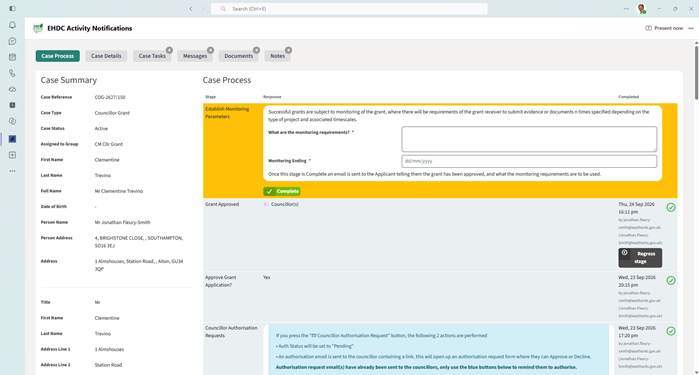
Or simply go to the Activity Notifications tab.
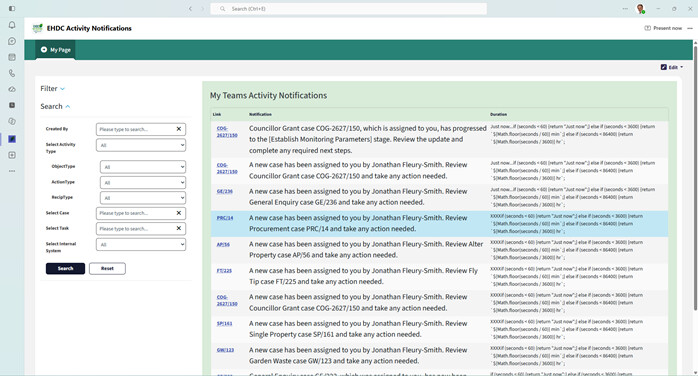
This architecture allows Liberty Create to trigger notifications while keeping privileged Microsoft Graph operations server-side and secure.
Key Components
1. Microsoft Teams App
A custom Teams application provides:
- Teams activity notifications
- Personal tab/dashboard
- Case and task access
- Deep linking
- Microsoft Entra ID SSO
The Teams app acts as the user-facing component of the solution and provides a familiar Teams-native experience.
2. Liberty Create
Liberty Create hosts:
- Cases
- Tasks
- Approvals
- Dashboards
- Workflow forms
- Notification data
The application has been adapted to support Teams with:
- Automatic SSO
- Teams-aware layout/theme
- Embedded Teams functionality
- Deep-link support
This means users can move between Teams and Liberty Create without constantly re-authenticating.
3. TeamsJS Integration
This is where things get really interesting.
Using the Microsoft Teams JavaScript SDK, Liberty Create can understand the environment in which it is running.
When a page loads inside Teams, the widget can retrieve:
JavaScript
microsoftTeams.app.getContext()
Show more lines
This provides:
- User ID
- Tenant ID
- Team ID
- Channel ID
- Theme
- Host application
- Entity URL
- Custom parameters
Liberty Create can then dynamically adapt behaviour based on that context.
Deep Linking
Rather than sending users to a generic dashboard, notifications can open a specific record.
Example:
User receives notification
│
▼
Clicks notification
│
▼
Teams launches application
│
▼
Specific case opens automatically
Supported examples include:
- Cases
- Tasks
- Approvals
- Recruitment requests
- Procurement workflows
- Complaints
- Authorisations
This significantly reduces navigation overhead and improves adoption.
Context-Aware Pages
The real power comes from allowing pages to change behaviour depending upon parameters supplied by Teams.
Single Sign-On
Users authenticate once through Microsoft Teams.
Benefits include:
- No additional login screens
- Seamless user experience
- Entra ID identity available throughout the application
- Consistent permissions and security model
The result is that Liberty Create feels like a natural extension of Teams rather than a separate system.
Future Opportunities
Once TeamsJS context is available, there are lots of possibilities:
- Team-specific dashboards
- Department-level reporting
- Context-aware pages
- Team and channel filtering
- Intelligent routing
- Rich Teams integrations
- Teams-hosted operational dashboards
- Workflow approvals directly from Teams
The integration layer becomes much more than simply sending notifications. It becomes a bridge between Teams and Liberty Create.
Interested?
If you’re using Netcall Liberty Create and Microsoft 365, I’d be happy to share ideas and implementation approaches around:
- Teams Activity Notifications
- Microsoft Graph integration
- Entra ID SSO
- TeamsJS context handling
- Deep linking strategies
- Teams-native Liberty Create experiences
Happy to share all technical setup, data structures, API calls, app manifests, etc…
For EHDC who are heavily invested in Microsoft Teams, we believe this to be one of the most effective ways we’ve found to increase workflow visibility and bring Liberty Create directly into users’ daily working environment.
Thanks for your time
Jonathan FS (East Hampshire District Council)