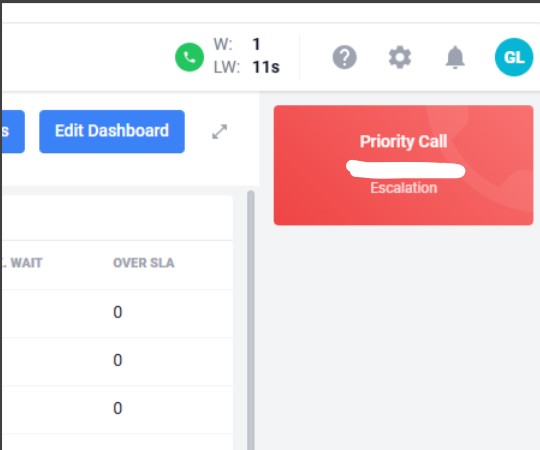
We have noticed today that when a call uses the queue jump feature when presented to the agent it is displayed in red displaying ‘priority call’ rather than the usual green. I can’t see any settings within platform that would change this.
Is this part of a recent update? Just curious as we had not noticed this until today, I could not see any mention in the recent update notes.
This is an intentional change that was introduced in a recent release (5.16). Queue Jump calls have always bypassed an agent’s interrupt rules, which means they are treated with a higher priority than standard calls. Previously, the red “Priority Call” indicator was only shown for switchboard-related calls, but this has now been extended to all Queue Jump calls.
The change was made to provide clearer visibility that these calls are being prioritised and may be presented differently from standard queue calls.
As a result, any call that uses Queue Jump may now be displayed in red with the “Priority Call” label, even when it is not associated with a switchboard queue.
I apologise this wasn’t called out clearly enough, but I can see there is a mention of it in the release notes for v5.16.
Key Changes
Contact Centre Changes
When a priority call enters a queue or is transferred the incoming call card will be red with the title “Priority Call”, when accepted the interaction card will have a red icon and left border.