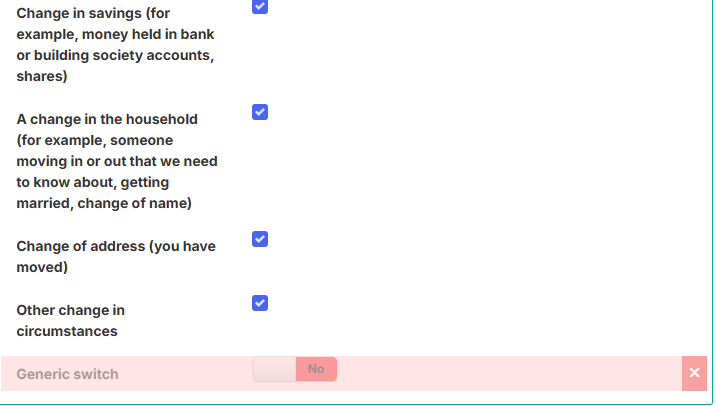
I have a set of check box choices on my multipage form - each linked to a field in the data object. At least one of these check boxes need to be ticked before the user can move onto the next page.
I’ve looked at Rules but can’t seem to work out how/ where to set up the parameters so, I’ve added an extra field (it’s part of the data object) on the form to set to true or false if any of the check boxes have been selected but I can’t seem to hide this field and there doesn’t seem to be any property that I can use to validate the checkbox option in order to set this field to true or false.
Any pointers much appreciated.
You could add a Generic switch element, set the wrapper to Hidden row, set the presenter to Big switch, then have dependencies on the switch that are “Field1 = Yes Then Set value to Yes”, “Field2 = Yes Then Set value to Yes”, etc. This would condense the check onto a single field on the form. You could then add a visibility condition on the Next button that requires the Generic switch to be Yes to show the button and the same (but inversed) for a fixed text element to display a suitable error message (“You must select one of the above options”)
Other than that you may need to write a validator for the checkboxes that flags them as invalid if all the others are unchecked. Might be able to do a generic one rather than having to write a separate one for each checkbox.
It sounds like each checkbox able to have a dependency on it, which looks at each other checkbox, and if they are all set to empty, then THIS checkbox should be set to mandatory.
When the page loads, all will be empty, and all will appear mandatory.
Once any checkbox is set, all the others will no longer be mandatory, and the user can proceed.
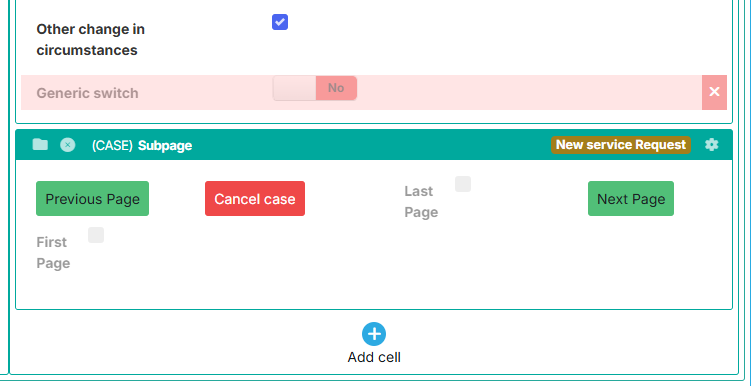
Thank you aphillips012. I’ve added the Generic switch element and set the presenter to Big Switch with the dependencies. I can’t seem to add a condition to the next button (it’s a Case subpage); however, the form is a multi-page form so, I’m using the built-in multi-page features. I wanted to set a filter on the Generic Switch - if it’s set to No then display a message - they therefore cannot navigate to the next page. However, the Generic Switch is not being exposed as it’s not part of the data object and I can’t see it as an attribute.
Is there a way to retrieve the value of the generic switch?
Thank you
The switch will need to be in the same widget group as the other elements/rest of the page. I believe that normally fields in a widget can only interact with other fields in the same widget, but if you put it all in a widget group then they can interact with fields in other widgets within the group. The generic switch doesn’t get saved in any way so it is safe to put wherever it is needed.
The Switch IS in the same widget group (form widget)
That’s weird, it should definitely show up as selectable in the dependency configuration. Are you able to send a screenshot fo the setup?
The Next page is in a separate widget: