Hi
Is there any way to create a Decision step within a VA that checks if a specific Agent is logged in or not?
Hi @MattMee,
This isn’t something you can do within a Decision step on its own. Instead, you’d want to look at using the
That will allow you to check whether a specific agent is logged in or not.
If you’re looking to base the logic on a skill rather than an individual agent, you can use a Query Block to pull back the relevant queue information, and then use a Decision step to route the interaction based on your criteria.
Which approach is best really depends on what you’re trying to achieve. If you’re happy to share a bit more about the use case, I’d be more than happy to offer some more tailored guidance.
Hope that helps 
Jonathan
Looks way outside the scope of anything I’ve done so far…
The use case is for callers to name the Agent (out of 40!) that they wish to contact. If the Agent is not available, the call goes to a VoiceForm which would then be assigned to that Agent.
The speech recognition for 40 names is going to be a challenge, based on experiments so far.
I think I could achieve this by creating 40 queues, with each agent being the sole member skilled to that Queue, I could then use the Callback and In-Queue flows.
I was wondering if there was a less messy way of doing it by querying the Agent log-on status
At the moment, the most straightforward approach is to create one Queue per Agent.
The upside of doing this is that you can:
- Report on each individual Agent
- Better understand routing behaviour
- Offer a callback option, if that’s something you’d find useful
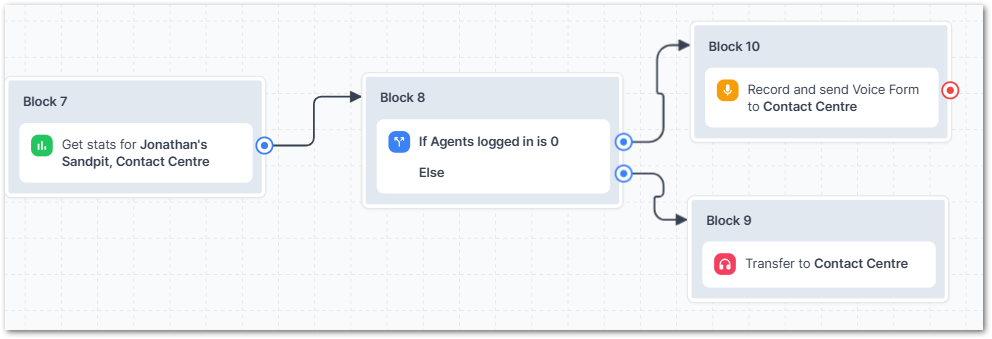
Once the queues are in place, you can use a Query step to check whether there are any logged‑in Agents for a given queue. From there, a Decision block can be used to route the call accordingly.
In practice, this means repeating the same pattern for each Agent:
- Add a Query block
- Select the relevant Group and Queue
- Store the number of logged‑in Agents in a variable (for example, Agents Logged In)
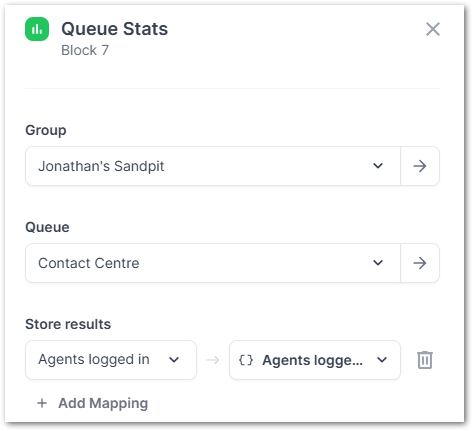
You can then follow this with a Decision step that checks whether Agents Logged In equals 0.
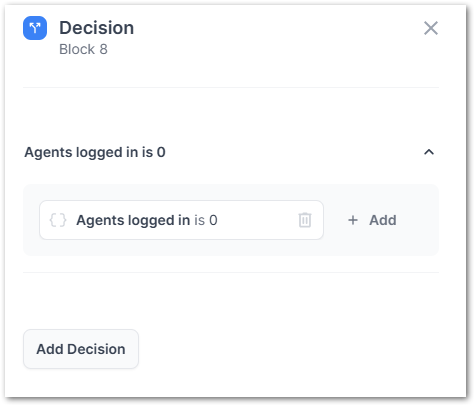
- If the value is 0, route the caller to a voice form
- Otherwise, send the call through to the Agent
If it is 0 - Go to the Voice form if Else, then go to the Agent.
An alternative approach is to use the API step. This removes the need to create a queue for each Agent, as you can instead:
- Look up the Agent by email
- Check their current login state
- Use the Preferred Agent option within the Transfer to Queue block
This method is a bit more complex, but generally less fiddly to maintain once it’s set up.
I’m more than happy to walk through either option with you if that would be helpful.
Finally, if this is something you’d like to see supported more natively, it would be great to add it to the Ideas portal so we can look at productising it properly.
Let me know your thoughts
Jonathan
Hi Jonathan
Yes a walkthrough of the API Step approach would be useful, please.